Get expenses into Buildplus fast
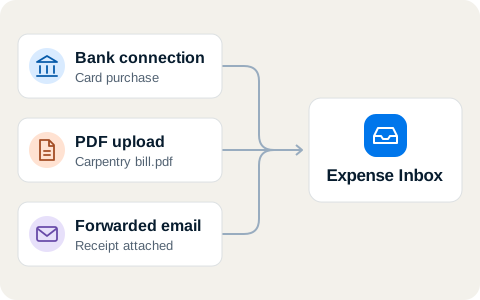
Receipts, card purchases, and subcontractor bills arrive in one inbox.
AI reads each document and matches it to its payee, project, and card transaction.
One place for the receipt in your truck and the bill in your email.
- A receipt that you photograph at the counter is in the inbox before you leave the parking lot.
- AI reads the payee, the amount, and the items from each document and matches it to the correct project, so nobody types or sorts them.
- An expense that is in the inbox cannot be left off the client’s invoice.
Work through the inbox, one expense at a time.
Bring expenses into the inbox
Match the receipt with the charge
Choose what to handle next
Work through the inbox, one expense at a time.
Bring expenses into the inbox
Match the receipt with the charge
Pine & Beam Carpentry$4,800.00Maple House / 2 expensesRequested
- Door and window trim$4,000.00
- Baseboards and finish work$800.00
Choose what to handle next
I get paid fast, I can pay my subs fast, the money doesn’t stop moving and I always know my cost to complete.
I’m constantly checking the project budget when I’m on site with subcontractors.
Anthony Marchionne
Coyote River Consultants
FAQs
How can a subcontractor send me a bill?
Share your request link so the subcontractor can send a bill with its documents. You can also forward an emailed bill to your company’s intake address.
What happens to a purchase I already paid for?
Open the purchase to check the receipt and coding. Keep it as a company expense or assign it to a project for reimbursement.
Can I review a bill before I know the project?
Yes. The inbox shows the purchase as Unassigned. Open Coding when you know which project or company should carry the cost.
How do I decide when an expense is done?
Your company chooses which steps are required for receipts, coding, and payment. Use Later when you need more information and return to the expense when you have it.
Work through the inbox, one expense at a time.
© 2026 Buildplus. All rights reserved.